
Could the longest IPTV term be the wrong choice for your household? The best IPTV subscription plans match how you watch, not simply how long you’re willing to commit. Sports fans, casual channel surfers, and on-demand viewers have different priorities. A plan that looks appealing on paper still needs to suit your devices and routine.
When channel counts, sports coverage, and streaming-quality claims compete for your attention, compare the viewing experience and commitment side by side. Then choose a term that fits your needs.
This guide covers what to assess, from live channels and sports to on-demand movies and shows, Full HD channels, and device compatibility. You’ll see how 1-, 3-, 6-, and 12-month terms can fit different viewing habits, without assuming a longer term means savings. Edge IPTV also offers a 24-hour trial, so you can explore the service before choosing a longer subscription. By the end, you’ll know what to look for and how to make a confident choice.
Key Takeaways
- Look beyond the subscription term: weigh content, compatible devices, and your regular viewing routine together.
- Match your priorities to the lineup, whether you’re focused on live sports and pay-per-view or movies and shows on demand.
- Compare IPTV subscription plans by how long you want to commit, rather than assuming a longer term is automatically better value.
- Use Edge IPTV’s 24-hour trial to explore device access, the electronic programme guide, and the content you watch most.
- Follow a clear decision path: set your viewing priorities, assess device fit, try the service, then choose a 1-, 3-, 6-, or 12-month term.
IPTV subscription plans: what are you choosing?
Choosing a term is only one part of selecting an IPTV service. The content should match what you want to watch, the service should work with a device you use, and the viewing routine should suit your household. An IPTV subscription is paid access to television and on-demand programming delivered over internet protocol networks; the subscription term is how long that access lasts. The term sets your commitment, while the service itself determines what you can browse and watch. For a technical overview of Internet Protocol television (IPTV), including how it delivers programming, see Wikipedia.
Edge IPTV offers 1-, 3-, 6-, and 12-month subscriptions. Each sets a different commitment length, but the longest term isn’t automatically the right fit. Start with your viewing habits and confidence in the experience, then consider how long you want to commit.
What does an IPTV subscription plan include?
Edge IPTV offers live channels, sports and pay-per-view events, plus movies and TV shows on demand. The electronic programme guide helps you browse scheduled programming and see what’s coming up, so you can find live content without relying on memory or guesswork.
Consider what you watch regularly. If live games or events are your main draw, sports and pay-per-view may be central to your decision. If you watch at different times, on-demand movies and TV shows may matter as much as live channels. The mix you care about is a more useful starting point than a headline channel count. Check the details of the subscription term you’re considering to understand what it includes.
Why the subscription term matters
Term length determines how long you commit and how much time you have to assess whether the service fits your routine. A 1-month subscription is a shorter commitment; 3- or 6-month terms give you longer periods to watch; and a 12-month subscription is the longest option. These are differences in duration, not a guarantee that one term will suit everyone better.
Think about how often you’ll watch and what you already know about the experience. Someone who expects to watch live programming most evenings may make a different choice from someone who mainly wants a few shows or occasional sports. If you’re still learning how the service fits your devices or schedule, a shorter term gives you time to assess regular use before choosing a longer commitment.
Compare IPTV subscription plans on three fronts: what you want to watch, where you’ll watch it, and how long you’re ready to subscribe. That keeps the decision focused on your viewing needs, not just the length printed on a plan.
Match IPTV subscription features to what you actually watch
Start with your viewing habits, not a feature checklist. Edge IPTV brings together 6500+ channels, sports and pay-per-view events, on-demand movies and TV shows, an electronic programme guide, Full HD channels, anti-freeze technology, and 24/7 active support. The useful question is which of these features you’ll use regularly.
Choosing around live sports and events
If live sports drive your viewing, make a shortlist of the leagues and event types you follow. Edge IPTV lists coverage including the NFL, NBA, NHL, MLB, Premier League, Champions League, and UFC, alongside pay-per-view events. Think about what you actually tune in for: a weekly league game, a major tournament, or occasional fight nights. That shortlist helps you assess whether the sports offering suits your routine, without assuming a particular event, broadcast, or channel will always be available.
Also consider how you watch. If you plan around scheduled games, the electronic programme guide can help you browse upcoming programming. Full HD channels and anti-freeze technology are stated service features, and 24/7 active support is part of the offering. These features describe what Edge IPTV provides, rather than promising identical performance for every stream or event.
Balancing live channels with on-demand viewing
Live channels suit viewers who like to follow scheduled programming as it happens. On-demand movies and TV shows offer a different rhythm: choose something when it fits your evening, rather than planning around a broadcast time. If you watch both, weigh both categories instead of letting one headline feature make the decision for you.
The guide helps you find scheduled programming, while the on-demand library gives you another way to choose what to watch. Edge IPTV’s stated catalogue breadth is 6500+ channels; that figure refers to channels, not a count of movies or shows. Focus on whether live viewing, sports, and on-demand choices align with your habits.
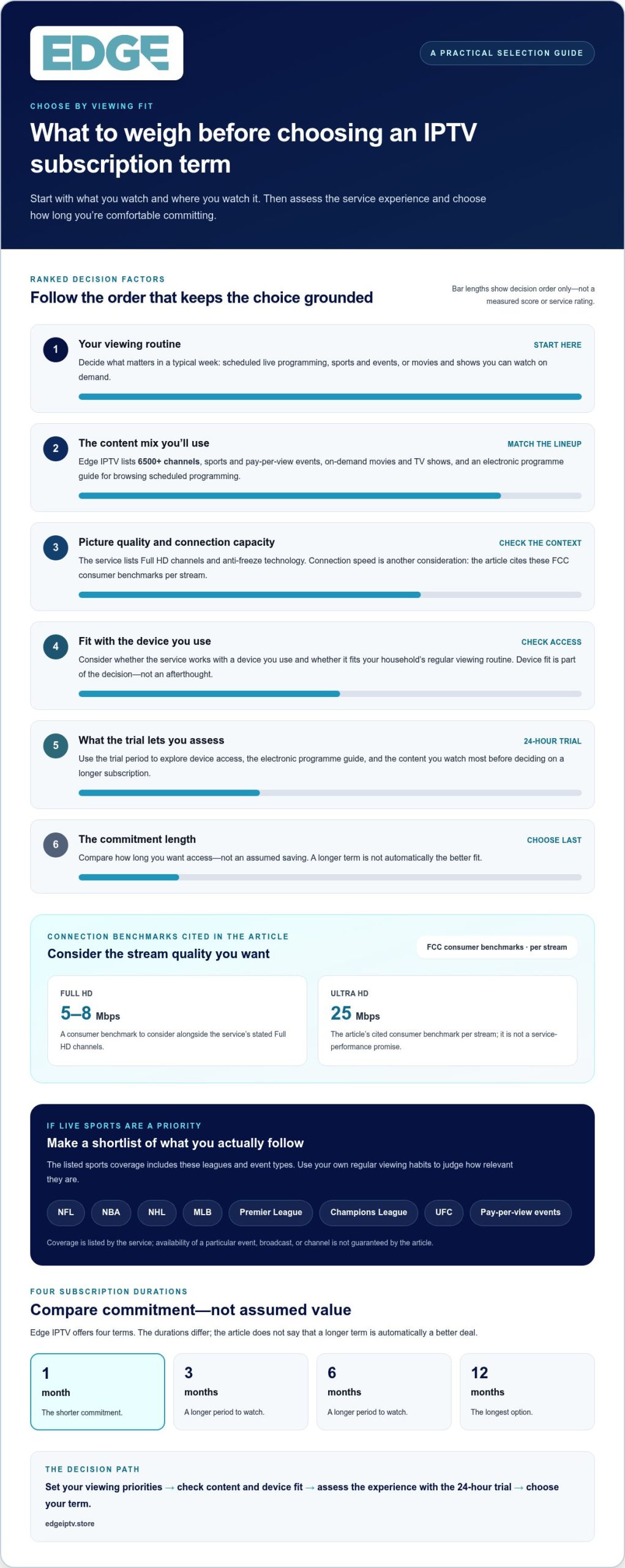
Picture a typical week. If you mostly tune in for live games, prioritize the sports and event types you follow, then consider whether other live channels add value to your routine. If you watch shows at varied times, give on-demand viewing more weight. Your home connection matters for picture quality, too. The Federal Communications Commission’s broadband speed guidelines give consumer benchmarks of 5 to 8 Mbps for Full HD and 25 Mbps for Ultra HD per stream. These can help you assess connection capacity alongside the service’s Full HD channels.
Use this feature check to compare IPTV subscription plans based on your viewing habits, rather than treating them as a bundle of claims. Explore Edge IPTV’s content and viewing features in the Edge IPTV service overview.
Compare IPTV subscription terms without guessing at value
The right term depends on how much commitment feels comfortable, not on an assumption that more months automatically mean a better deal. Edge IPTV offers four subscription durations. Compare them by the time you’re choosing to commit, then review the current plan details before deciding. The comparison below is about term length only; it doesn’t imply price differences, renewal rules, or identical features across every option.
| Subscription term | Commitment duration | Could suit viewers who… |
|---|---|---|
| 1 month | One month | Want a shorter initial commitment |
| 3 months | Three months | Are comfortable committing beyond a month |
| 6 months | Six months | Have a settled routine and prefer a longer term |
| 12 months | Twelve months | Know their viewing needs and are ready for the longest commitment |
Use the table as a starting point, not a verdict. A term doesn’t tell you whether the service suits your screen, content preferences, or weekly schedule. It tells you how long you’re selecting access for. Before choosing, compare the current plan details and decide which commitment matches your confidence and viewing habits. Don’t infer savings or added features from duration alone.
When a shorter subscription term may make sense
A 1-month subscription may be a practical starting point if you’re still assessing how the service fits your devices, which content you’ll watch, or how often you’ll use it. It’s a shorter initial commitment than the other options, but it can’t guarantee that the service will suit you. Consider it if you want to experience your regular viewing routine before committing for longer.
When to consider a longer subscription term
A longer term may make sense once you understand what you watch and feel comfortable with how the service fits your routine. The 3-month option is a three-month commitment, the 6-month option is six months, and the 12-month option is a full year. Choose based on the length you’re ready to commit to, not on assumed discounts or different included features.
For example, if your viewing habits are still changing, a shorter commitment gives you more flexibility to reassess at the end of the term. If you already know you’ll use the service regularly and are comfortable committing for longer, compare the 3-, 6-, and 12-month durations directly. Neither approach is automatically right; your routine and readiness matter.
Before selecting among IPTV subscription plans, make one final check: review the current details for the term you’re considering. Keep duration separate from price, feature, and renewal assumptions. That way, you’re choosing a commitment you understand instead of guessing at value from the number of months alone.
Use the 24-hour IPTV trial to assess the experience
Edge IPTV’s 24-hour trial gives you a practical window to explore the service before choosing a subscription term. Make that time useful by checking the device, guide, and content you’d use in a normal week. A focused test gives you clearer evidence for deciding whether the service fits your routine and which IPTV subscription plan feels appropriate.
A practical checklist for your trial
Use a device from your regular viewing setup, then work through the basics. Edge IPTV supports smart TVs, Android devices, Amazon Fire Stick, Windows and macOS computers, MAG, and devices that support M3U or Xtream Codes XC portals. Try the device you expect to watch on most and assess the service under familiar conditions.
- Check device access. Open the service on a compatible device you normally use for viewing. Notice whether the experience suits your screen and preferred way of watching.
- Explore the electronic programme guide. Browse scheduled programming and practise finding the types of shows, channels, or events you’d look for on an ordinary evening.
- Sample your preferred content. Explore relevant live channels, sports, pay-per-view events, and on-demand movies or TV shows. Focus on the categories you’d return to, not just the first item you find.
- Try your usual viewing times. If you typically watch after work or follow a scheduled event, use the trial during a similar time. Where possible, assess it on the devices you normally use.
Assess the service before choosing a term
Pay attention to the overall experience as you browse and watch. Does the guide make scheduled programming easy to find? Can you locate the content categories you care about? Do the available options fit how you usually spend your viewing time? These observations help you judge practical fit. A short trial is a snapshot, not a promise about how every channel or viewing session will perform.
Consider content and navigation together. A broad selection matters most when it includes programming you’ll actually choose. If you mostly watch live events, assess how easily you can locate relevant sports or pay-per-view content. If you prefer flexible viewing, spend time exploring on-demand categories. Use your own priorities as the scorecard.
After the trial, decide how confident you feel about using the service regularly. If you’re still weighing device access or content fit, a shorter commitment may feel more suitable. If the experience aligns with your routine, you can consider a longer term. The trial informs your decision; it doesn’t make it for you.
Start your 24-hour Edge IPTV trial and use the time to test the device, guide, and content that matter most to you.
Choose an Edge IPTV subscription plan and get started
You’ve compared what you want to watch and considered how long you’re comfortable committing. Now make the choice in a clear sequence: identify your viewing priorities, assess device fit, use the 24-hour trial to explore the service, then choose a subscription term. That keeps the decision grounded in your routine instead of a headline claim.
Before selecting from Edge IPTV’s 1-, 3-, 6-, and 12-month options, consider what your assessment showed. Did you find the live channels, sports, or on-demand programming you’d use? Was browsing the guide manageable? Does the compatible device list include the screen you plan to watch on? Your answers can help you decide whether a shorter or longer commitment feels appropriate.
Check device fit before you subscribe
Edge IPTV works with smart TVs, Android devices, Amazon Fire Stick, Windows and macOS computers, and MAG. It also works with devices supporting M3U or Xtream Codes XC portals. Use this list to assess compatibility: consider the device you expect to watch on most and whether it belongs to one of these supported categories.
Households may watch on more than one kind of screen, so think beyond the main television. A computer or Android device might be part of your routine, too. Compatibility depends on the device category and support for M3U or Xtream Codes XC portals. Check your own setup rather than assuming a device works simply because it connects to the internet.
Take the next step with Edge IPTV
Once you’ve assessed your content priorities and device fit, compare the available terms by commitment. The 1-month option is the shortest; 3 months and 6 months extend the commitment; 12 months is the longest. Review the current plan details before selecting one, and don’t assume duration alone determines pricing or included features.
If you haven’t explored the service yet, the 24-hour trial offers a first look before you choose a subscription term. Use it to assess whether the content and navigation fit the way you watch. Edge IPTV also lists 24/7 active support as a service feature, which you can weigh as part of your decision.
Your final check is simple: confirm the viewing priorities you care about, make sure your intended device is in a compatible category, and select the term that matches your comfort with commitment. Then explore Edge IPTV subscription plans and choose with a clearer picture of what suits your viewing routine.
Make your next viewing choice with confidence
The best IPTV subscription plans fit your real routine. Let your viewing priorities guide the decision, and use the trial to identify what matters before you commit. The details to weigh include content selection, Full HD channels, anti-freeze technology, and 24/7 active support. Focus on how those features fit your expectations instead of choosing a term simply because it’s longer.
Edge IPTV’s 24-hour trial and 6500+ channels give you a starting point for exploring the service and deciding what you’ll use. Review the available options, consider your preferred viewing term, and choose the next step that fits your needs.
Explore Edge IPTV subscription plans and move forward with a clearer idea of what you want from your viewing experience.
Frequently Asked Questions
Is an IPTV subscription the same as an internet plan?
No. An IPTV subscription provides access to programming, while an internet plan connects your home or device to the internet. For example, a compatible smart TV might use your home Wi-Fi to access IPTV, but the subscription doesn’t create or supply that connection. You need both an internet service and a compatible device to watch. Keeping those roles separate makes it easier to understand what your IPTV subscription covers.
Can I try Edge IPTV before choosing a longer subscription plan?
Yes. Edge IPTV offers a 24-hour trial, so you can explore the service before deciding which IPTV subscription plan suits you. Use the time to browse the programme guide and look for content you’d genuinely watch, rather than judging by a quick glance at the menu. Try it on a device you use regularly, then consider whether the experience fits your viewing routine before selecting a term.
Can I watch live sports with an Edge IPTV subscription?
Edge IPTV lists live sports and pay-per-view events, including NFL, NBA, NHL, MLB, Premier League, Champions League, and UFC coverage. Use the trial or your subscription to explore the sports categories that match your interests. A league listing doesn’t guarantee that every event or broadcast will be available, so assess the categories you care about rather than assuming every game or fight is included.
Can I use an IPTV subscription while travelling outside Canada?
Edge IPTV states that customers can access the service from anywhere in the world. You’ll still need an internet connection and a compatible device while travelling. Before leaving, think about which device you’ll bring and how you’ll connect it at your destination. Access from anywhere doesn’t guarantee the same viewing conditions on every network, so your experience may depend on the connection and circumstances where you watch.
What is an electronic programme guide in IPTV?
An electronic programme guide, or EPG, is an on-screen guide to scheduled television programming. It helps you browse by channel or time when you want to find a programme on a live schedule. For example, if you know roughly when a show airs but not its channel, the guide can help you look through scheduled listings. It’s different from searching for an on-demand movie or show.
Can I use an IPTV subscription on a device with M3U or Xtream Codes XC support?
Yes, Edge IPTV lists compatibility with devices that support M3U or Xtream Codes XC portals. These formats are used by compatible IPTV devices or applications to access a service. Use the portal option available on your device during setup. Edge IPTV also supports smart TVs, Android devices, Amazon Fire Stick, Windows and macOS computers, and MAG.
Does Edge IPTV sell a VPN subscription with its IPTV plans?
An IPTV subscription provides access to television and on-demand programming. VPN access is a separate service category from IPTV programming. Keep the distinction in mind when comparing what a subscription includes: an IPTV plan covers the television service, not an internet connection.