
An annual IPTV plan’s monthly equivalent is the total 12-month fee divided by 12. That makes comparing an IPTV 12 month subscription straightforward, but the right value also depends on what you’ll actually watch and how many devices need access.
It’s easy to focus on the subscription term and miss the bigger question: what comes with it? Live channels, sports, movies, and TV shows can make a plan more useful day to day, while streaming quality and your internet connection shape the viewing experience.
This guide explains how to compare annual-plan costs in Canadian dollars, what to look for in channel and video-on-demand libraries, and how to assess quality and internet speed for your setup. You’ll also find practical points to consider before choosing, including device access and the difference between watching on one screen and sharing viewing across a household.
Key Takeaways
- Compare annual plans by device count and simultaneous streams, then work out the effective monthly cost from the full-term price.
- Assess channel and on-demand libraries by the live content, sports, movies and shows you actually plan to watch.
- Streaming quality depends on both the available video resolution and the strength of your home internet connection.
- Review the subscription term and renewal terms so you know how long access lasts and what happens when it ends.
- Explore Edge IPTV’s 12 Month, 6 Months, 3 Month and 1 Month options to find a subscription duration that fits your viewing plans.
How much is the annual IPTV plan per month?
To find the monthly equivalent, divide an annual plan’s total price by 12. Compare options with the same device allowance, because a lower total may include fewer simultaneous streams. A stream is one programme playing at a time. An app installed on several devices doesn’t automatically mean they can all play different programmes together.
Annual plan comparisons may show tiers for one, two, or three devices, with matching simultaneous-stream allowances. Treat these as separate options, not automatic permission to use one account across several screens. Count the televisions or devices people may use at once. One stream may suit a solo viewer; higher allowances may better fit overlapping household viewing.
For Canadians comparing an IPTV 12 month subscription, calculate the monthly equivalent from the full annual total. Compare the stream limit, renewal terms, and supported devices too. A 12-month term suits viewers expecting consistent use; a shorter term reduces the commitment while they assess the service. Read the terms for access duration, renewal, cancellation, and refund conditions.
The IPTV label alone doesn’t identify a service’s authorization or content rights. Before subscribing, review the provider’s published information about its channels, content, and terms. Price and device compatibility alone aren’t enough to assess what the service provides.
If a service’s authorization or terms are unclear, you may have less certainty about what access your purchase covers. Review its published content information, payment terms, and customer support details before paying. Don’t use a large catalogue or low price as the only basis for deciding whether a service fits your needs.
Trials, refunds, and customer support differ by provider. Read the terms to learn whether a trial is offered, what refund conditions apply, and how support requests are handled. Treat these details as part of your purchasing decision rather than assuming every provider follows the same policy.
Before choosing an IPTV 12 month subscription, match the stream allowance to your household, check device compatibility, and review the full terms. Supported setups can include smart TVs, Android devices, Amazon Fire Stick, Windows and macOS computers, MAG devices, and devices supporting M3U or Xtream Codes XC portals. Confirm your intended player supports the relevant access method.
For setup, identify the device first, then install a compatible player and enter the service’s access details. For a multi-screen home, repeat that check for each device and compare expected viewing with the stream allowance. The annual IPTV subscription details can help you review plan information alongside your setup needs.
Included channels and on-demand content
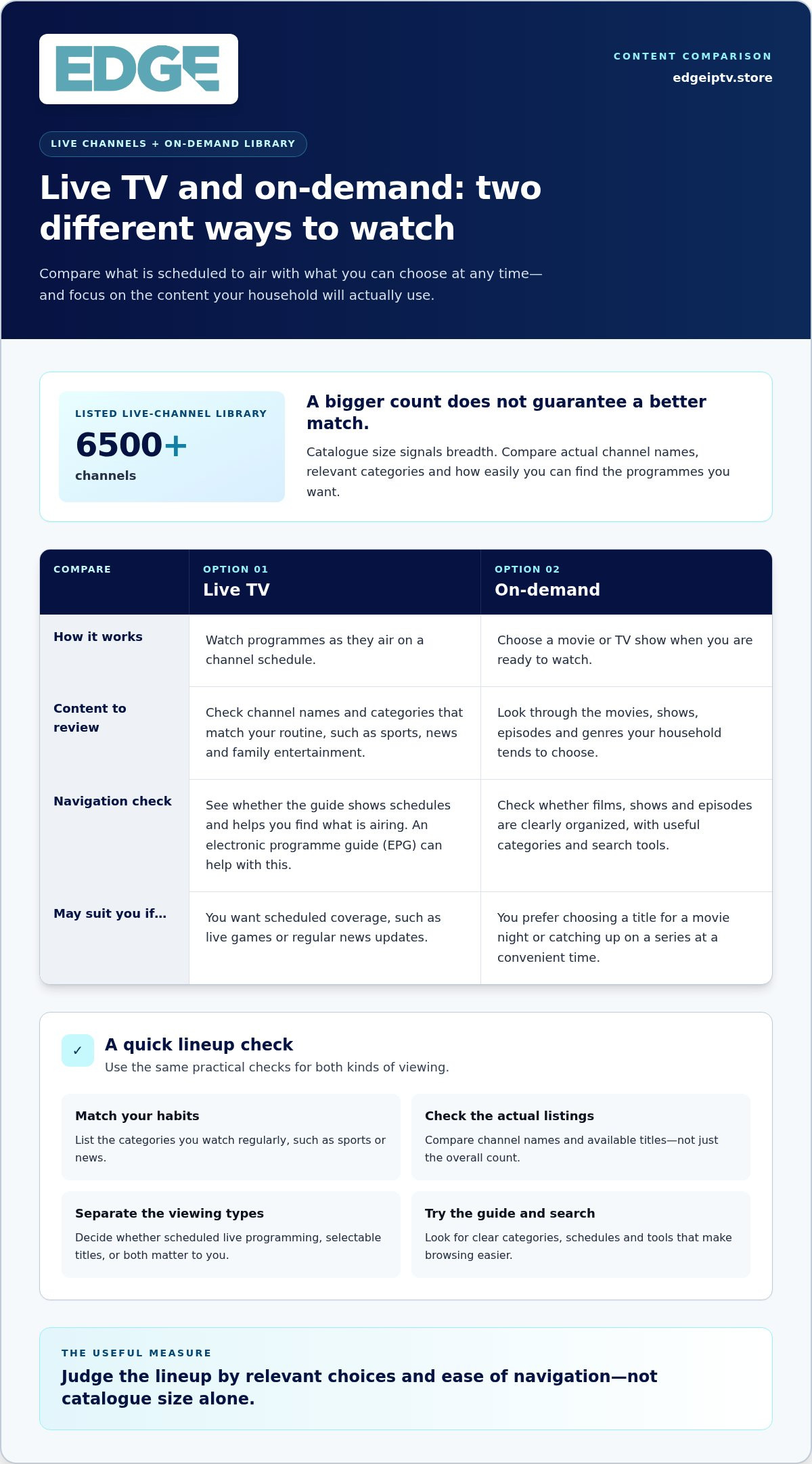
A channel count gives a quick sense of catalogue size, but it won’t tell you whether the lineup matches your routine. Compare live TV and on-demand choices separately, focusing on the content you actually watch.
Channel and Package Selection
Start with your viewing priorities: sports, news, family entertainment, or films. Then compare package categories and channel names with those interests. A sports fan may care most about live games and event coverage, while another viewer may value news and general entertainment. Specific names help you judge fit more clearly than broad category labels.
Also consider how the player organizes its guide. Clear categories and a searchable channel list can make a large lineup easier to browse. For example, check whether you can move from sports to news without scrolling through unrelated listings.
Live Channel Library
The service described here offers 6500+ channels. That figure indicates catalogue breadth, not how many channels will matter to your household. Focus on the live channels and categories you expect to use, such as sports for a game night or news for a regular update.
Check how the guide identifies live programming and displays schedules. An electronic programme guide (EPG) can help you find what’s airing and decide whether a channel fits your routine. Compare the lineup with your usual viewing habits rather than assuming a larger number automatically means a better match.
Movies and TV Shows on Demand
On-demand movies and TV shows serve a different purpose from live channels. You choose a title when you’re ready instead of following a broadcast schedule. This can suit a planned movie night or catching up on a series at a convenient time.
Review how the player separates films, shows, and episodes. Search and useful categories make titles easier to find. Consider the genres your household chooses most, such as comedy for a casual evening or drama for a series session. A catalogue is most useful when its organization helps you find content without unnecessary browsing.
Use this checklist to compare a lineup:
- Match your habits: List the categories you watch regularly, such as sports or news.
- Review channel names: Compare actual listings, not just the overall count.
- Separate viewing types: Distinguish scheduled live programming from selectable titles.
- Try the guide: Look for clear categories, schedules, and search tools.
The practical takeaway is simple: judge the service by relevant choices and ease of navigation, not catalogue size alone. A household that watches live sports and chooses movies on weekends should assess both parts of the lineup before deciding whether it fits.
Streaming quality and internet speed
Picture quality depends on the selected video, your screen, and the connection serving it. Compare the available resolution with your device and household viewing habits.
Supported Streaming Resolutions
Full HD channels are included in the plan. Full HD describes the picture format, but the screen and individual programme also affect what you see. A Full HD television can display a compatible Full HD channel, while content delivered at a different resolution may look different.
Check that your device and player support the stream format you intend to watch. For example, compare the display settings on an Android TV device with the resolution shown for a channel. Don’t assume every movie, series, or live broadcast uses the same format simply because Full HD channels are included.
Stream Capacity
Stream capacity means how many programmes can play at once. The standard IPTV Canada subscription allows one stream at a time. That works for a viewer using one screen, but not for two people watching separate programmes simultaneously.
Count concurrent viewers rather than devices with the player installed. If one person starts live television while another chooses a movie, both need an available stream. Compare your household’s likely viewing pattern with the plan’s simultaneous-stream allowance before choosing.
Playback Quality and Uptime
Buffering or changes in picture clarity can involve the home network, device, player, or service. Note whether a problem occurs on one screen or across several. If a series stalls on a smart TV but plays on another device, compare their connections and player settings.
Service availability and playback quality are different considerations. Streaming also depends on the network path between the service’s servers and your home. Review the subscription terms for information about access, and treat a resolution label as a format description, not a promise of uninterrupted playback.
Internet Speed Requirements
Connection demands change with resolution and the number of streams playing together. One Full HD stream and several simultaneous streams create different demands. Downloads, video calls, and other household internet use can also compete for capacity during viewing.
Test the connection near the television during your usual viewing period. Compare Wi-Fi with a wired connection if available. If playback varies between rooms, check the signal where the device sits. Note whether the issue affects live television, on-demand movies, or both before adjusting the player.
Before starting a longer subscription, test the setup you intend to use. Watch a Full HD channel and an on-demand title, then note picture clarity and buffering. If another viewer will watch at the same time, test that household scenario too. This helps you assess the actual device, player, and connection combination without assuming every screen will behave identically.
Annual IPTV subscription plans and pricing
Annual pricing depends on the plan’s device allowance and simultaneous-stream capacity. Compare the full prepaid term, its renewal conditions, and the monthly equivalent before choosing.
Annual and Monthly Costs
A month plan and an annual plan differ in payment timing and commitment. To compare them, take the annual total and divide it by twelve. Then compare that monthly equivalent with the monthly plan’s stated cost. Keep device allowance and stream capacity consistent; otherwise, the comparison may not reflect the same service.
The typical price depends on the plan and is provided after a quote request. Device count and stream allowance are important cost factors.
Savings on Annual Packages
An annual package can cost less overall than paying month by month, but savings depend on the prices being compared. Use the same IPTV service, device tier, and viewing features in both calculations. Compare the annual total against twelve monthly payments for an equivalent plan. Don’t treat a savings percentage as useful without matching those details.
For example, a household needing multiple simultaneous streams should compare that tier’s annual and monthly options. A lower-priced plan with fewer streams isn’t an equal comparison. Check the complete term price and what access it covers before deciding.
Annual Plan Duration
An annual subscription term lasts twelve months. The Canadian market plan described in listings runs for 365 days, is prepaid, and does not renew automatically. That makes the end date and renewal terms useful details to understand before activation.
Mark the expiry date when access begins, then decide whether you want to renew. Don’t assume another term starts automatically. A contract and a prepaid subscription are different commitments, so read the terms for the plan you select.
Typical Subscription Price
There isn’t one typical price that applies to every annual IPTV plan. The total depends on the selected device tier and stream allowance, so compare like-for-like plans rather than relying on a broad market average.
Before paying, check the displayed total, term length, payment schedule, and renewal conditions. Confirm that your chosen player and device can use the service, then follow the activation steps. “Instant activation” or a guarantee should never replace clear terms about access and renewal.
Use this simple comparison process:
- Match the plan: Compare the same device tier and simultaneous-stream allowance.
- Calculate the equivalent: Divide the annual total by twelve.
- Review the terms: Note the prepaid period and renewal conditions.
- Check the setup: Confirm device compatibility and activation instructions.
Live TV, sports, movies and VOD
The strongest IPTV value isn’t just a headline channel count. It’s how well live channels, sports, movies, and on-demand viewing fit your routine.
A lineup advertised with 6,500+ channels can span many categories, but the total doesn’t show which channels you’ll actually watch. Look for the names and types that matter to your household, such as Canadian news, entertainment, or sports. Then consider how often you watch live television compared with programmes you choose on demand. A large selection matters most when it includes relevant content.
Sports viewing has a different rhythm from a movie night. Live games and premium pay-per-view events are tied to scheduled broadcasts, so access to live content can be a priority for fans. Think about the leagues or event types you follow, then assess whether the service’s sports and PPV selection fits. Don’t treat a general sports label as proof that every event or channel is available.
VOD, or video on demand, means selecting a movie or TV show from a library rather than watching it at a scheduled time. That flexibility works well for a series episode after work or a family movie night. Check how the library separates movies from shows and whether the player makes titles easy to browse. Clear categories make a large catalogue more useful.
Live TV and VOD also behave differently during playback. A live channel follows its broadcast schedule; an on-demand title starts when you choose it. If a live game buffers, note whether other devices are using the same connection. If a movie buffers too, compare playback on another compatible device, such as a smart TV or streaming device. This helps narrow down whether the issue relates to the connection, device, or player.
Use a practical viewing test before committing to a long plan. Try a live channel you’d watch regularly, find a movie, and open an episode of a series. Check that categories are easy to navigate on your television, and pay attention to playback at your usual viewing time. For households with different tastes, compare the channel mix and VOD library with each person’s typical choices.
- Sports fans: Focus on relevant live channels and premium event access.
- Movie viewers: Explore VOD categories and how easily titles can be found.
- Series watchers: Check how shows and episodes are organized.
- Shared households: Compare content choices with everyone’s viewing habits.
Review the IPTV subscription options to see how live and on-demand viewing may fit your entertainment routine.
Edge IPTV: 12 Month
Edge IPTV offers a 12 Month subscription for viewers planning to use IPTV throughout the year. Its service brings together live channels, sports, pay-per-view events, movies, TV shows, and an electronic programme guide.
Choose the annual term if its viewing options and duration suit your routine. If you’d rather commit for less time, Edge IPTV also offers 6 Months, 3 Month, and 1 Month subscriptions. Compare the term with your household’s viewing habits and the devices you plan to use before deciding.
Edge IPTV’s channel selection and on-demand entertainment can suit viewers who want live programming alongside movies and series. Explore the subscription options to see which duration fits your plans, then visit edgeiptv.store if you’d like to learn more.
Choose a term that fits your viewing plans
Your next step is to turn your viewing priorities into a clear plan choice. Consider how consistently you watch, whether the service fits your household’s setup, and how long you want to commit. An IPTV 12 month subscription may suit steady, year-round viewing; a shorter term can make sense if you prefer a smaller commitment.
Edge IPTV offers 12 Month, 6 Months, and 3 Month subscription options. Compare the available terms against your own routine, then choose the duration that feels practical for your plans. There’s no need to decide based on a headline alone. Focus on the viewing experience and subscription length you want.
Ready to take the next step? Contact Edge IPTV about annual plans and explore the option that fits your viewing plans. Make your choice with confidence and get ready for more of the entertainment you enjoy.
Frequently Asked Questions
Is there a contract with the yearly plan?
The Canadian annual plan described in market listings is prepaid, has no contract, and doesn’t renew automatically. That describes the listed plan, not every IPTV subscription. Before paying, read the specific terms for the plan you’re considering. Note the access start and end dates, renewal process, cancellation rules, and any refund conditions. Save the terms or receipt so you can refer to them later.
Why is 12 months the best value?
A 12-month plan can offer better overall value if you expect to watch consistently throughout the year. The trade-off is paying for a longer period upfront, so it may not suit someone still testing a service or expecting changing needs. Compare the annual total with the equivalent monthly option for the same features. Choose the longer term only if the viewing routine and commitment work for you.
Which IPTV providers offer 12-month subscriptions in Canada?
Edge IPTV offers a 12 Month subscription in Canada. It also has shorter subscription terms for viewers who prefer less commitment. When comparing providers, focus on more than the term: review the content, compatible devices, stream allowance, payment terms, and support details. A provider’s published offer should make clear what access the subscription covers and how you’ll use it after activation.
What channels, live TV, and on-demand content are included in Canadian IPTV subscriptions?
Channel lineups and libraries vary by subscription. Edge IPTV describes an offering with 6500+ channels, live sports, pay-per-view events, on-demand movies and TV shows, and a TV guide. To judge whether that mix suits you, name the channels and content types you watch most, then compare them with the service’s categories. A large catalogue is useful only when it includes choices you’ll actually use.
How do 12-month IPTV plans compare with monthly plans and traditional TV packages?
A monthly plan gives you a shorter commitment, while an annual plan covers a longer viewing period and is generally paid upfront. Traditional TV packages may bundle channels differently, so compare the actual content and total terms rather than the labels alone. For a fair decision, write down the channels you need, the devices you use, and how long you expect to subscribe. Then compare equivalent options.
What internet speed and devices are needed for IPTV streaming in Canada?
Choose a device that supports the service’s player and credentials. Compatible options can include smart TVs, Android devices, Amazon Fire Stick, Windows and macOS computers, MAG devices, and equipment supporting M3U or Xtream Codes XC portals. Required internet speed depends on video resolution, concurrent streams, and other household activity. Test the connection where you’ll watch, especially if the television uses Wi-Fi.
How do I set up an IPTV subscription on a smart TV, streaming device, or phone?
Start by identifying your device and compatible player. Install the player, then enter the service’s supplied login details or portal information, following its setup instructions. For example, an Android phone and a smart TV may use different player apps or menus. Keep your credentials private, confirm the correct portal format, and test a live channel before settling in for a movie or series.