
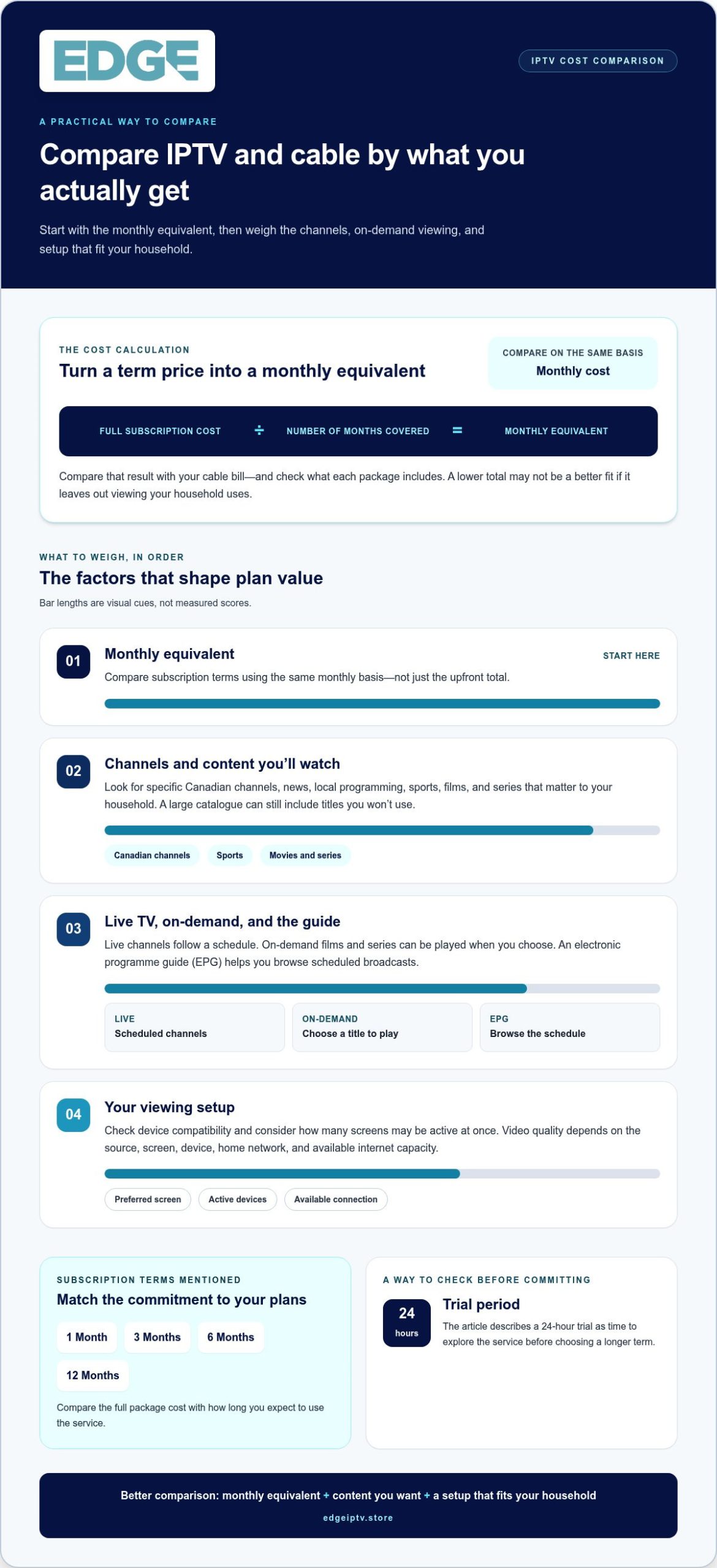
Cable’s monthly bill isn’t the whole comparison. In Canada, IPTV subscription plans can cost less than cable, but compare each plan’s monthly equivalent and the live TV and on-demand content included. Divide the subscription’s full cost by its term to see its monthly equivalent.
It makes sense to start with price. The term affects the monthly equivalent, while channel selection, movies and TV shows, and your viewing setup shape a plan’s value. A lower total isn’t automatically a better fit if the content or viewing options don’t suit your household.
This guide shows you how to compare IPTV and cable costs, calculate monthly equivalents for different subscription terms, and assess live TV, on-demand libraries, and trial options. You’ll have a clearer way to weigh the cost against what you want to watch.
Key Takeaways
- Compare IPTV with cable by weighing the monthly equivalent against the live TV and on-demand content included, not just the upfront cost.
- Turn a subscription’s total cost into a monthly equivalent by dividing it by the number of months covered.
- Look beyond channel counts: live sports, pay-per-view events, movies, TV shows, and a TV guide can all shape the viewing value.
- A 24-hour trial can give you time to explore the service before choosing a longer subscription duration.
- Explore Edge IPTV’s 1 Month, 3 Month, 6 Months, and 12 Month options to find a term that fits how you plan to watch.
Streaming features and content libraries
Channel counts catch the eye, but the useful measure is whether the lineup matches your viewing habits. Some IPTV listings advertise 25,000+ live channels and 120,000+ movies and TV shows. Treat these as advertised catalogue sizes, then compare categories that matter to your household, such as Canadian news, children’s programming, films, and live sports. A large total can still include channels you’ll never watch.
Separate live TV channels from on-demand titles. Live channels follow a schedule, while on-demand movies and series let you choose what to play. A TV guide, also called an electronic program guide or EPG, helps you browse scheduled broadcasts. Consider how these features fit together: a sports fan may value live event coverage, while a family may watch on-demand shows at different times.
Streaming quality depends on both the video feed and your internet connection. Published guidance varies: one recommendation gives about 10 Mbps for HD and 25 Mbps for 4K. Other figures put HD at 10-15 Mbps per device and 4K at 25-35 Mbps per stream. The practical takeaway is to consider every active screen. Two devices streaming at once need more capacity than one, especially when both use high-definition video.
Video labels describe resolution, not the whole viewing experience. HD and 4K can look sharper, but the source must offer that format, and the screen must support it. Picture stability also depends on the home network, device, and stream. Before choosing, compare advertised resolution options with the devices you actually use, such as a smart TV or streaming stick.
- Channel count: Look for the genres and live TV channels you watch regularly.
- On-demand library: Compare movies and series, not just the headline total.
- Guide: Check whether an EPG makes scheduled programmes easy to find.
- Connection: Match video quality to the internet capacity available for each screen.
Some providers advertise 99.9% uptime, a measure of server availability. It doesn’t describe the picture quality in every home or remove the effects of a local internet interruption. Consider uptime alongside quality details, channel coverage, and the features you’ll use. For a closer look at available IPTV subscription features, compare the service details with your viewing checklist.
The page states that 4K streaming requires a minimum internet speed of 50 Mbps on one device, while the IPTV provider states that standard-definition streaming requires at least 5 Mbps per stream. Use these figures as guidance when judging whether your connection can support the viewing you want.
Each subscription plan is advertised as including 20k+ movies and series. The page also says its IPTV service includes 7-day catch-up TV, which can help viewers watch programmes they missed.
How much does IPTV cost compared to cable in Canada?
Compare that monthly equivalent with the full term of an IPTV subscription, then weigh what each package includes. The lower figure matters less if the package leaves out channels, sports, or on-demand viewing your household uses.
For a fair comparison, list the cable services you watch, then match them against an IPTV channel list. Include live TV, sports, movies, and series. Consider whether you need one screen or several, and whether the connection setup suits your household. These details affect the value of either option.
What channels and on-demand content are included in Canadian IPTV plans? Listings can include live channels, sports, movies, and TV shows, but the selection varies by service. Some listings advertise 32,000+ live channels, 500+ international sports channels, and 20,000+ movies and series per plan. Treat those as catalogue counts; check specific Canadian channels and titles you want.
Look beyond the headline total when checking channel availability. Search a provider’s guide for Canadian news, local programming, and the sports leagues you follow. A hockey fan, for example, should look for relevant live sports channels, while a family may prioritize children’s shows and films. A large international lineup doesn’t automatically include your preferred Canadian channel.
How can I check whether an IPTV service is legally licensed in Canada? Look for clear information about the business and its authorization to distribute the listed content. A long channel list or an Android app alone doesn’t establish that distribution rights are in place.
What are the risks of using unlicensed IPTV services in Canada? The European Union warns that users of IPTV websites may face abuse of personal or payment data. Treat unclear payment requests and vague service identities as reasons to pause before sharing account or card details.
Compare the service during activation, not just by glancing at its catalogue. Check these items before choosing:
- Canadian channels: Find specific channel names in the live TV guide.
- Sports: Match the listed coverage to leagues and events you follow.
- On-demand: Look for movies and series your household would actually watch.
- Device fit: Confirm the service works with your Android device or preferred screen.
- Help: Note how to reach the support team if setup or playback needs attention.
Compare your monthly cable bill with the IPTV term’s monthly equivalent and the content included. That gives you a clearer picture of cost than channel totals alone.
Subscription durations and monthly equivalents
In Canada, IPTV subscription plans are available for 1, 3, 6, or 12 months. Choose a term by weighing how long you expect to use the service against the full package cost.
Available Subscription Packages
The four terms give viewers different commitment periods: 1 Month for a short test of an IPTV service, or 3 Month, 6 Months, and 12 Month for longer viewing. Compare what each package covers, including the channel lineup, on-demand library, and compatibility with your devices. For example, a compatible Android device may help you assess your setup before choosing a longer term.
Plan Prices by Duration
Package prices vary by subscription term, so compare the total for each option rather than assuming the longest suits everyone. A shorter term limits your commitment; a longer term covers more viewing time in one purchase. Compare package details and cost, then consider how often you’ll use live channels, movies, and series during that period.
Monthly Equivalents
To calculate a monthly equivalent, divide the full package cost by the number of months covered. Use the same method for 1, 3, 6, and 12 months, then compare the results. This makes different durations easier to assess, but the monthly equivalent isn’t a separate monthly payment; it’s a way to compare the total cost across terms.
Match the term to your viewing plans. If you’re new to IPTV in Canada, a shorter package limits how far ahead you commit while you learn the service’s interface and explore its library. If the channels and series suit your routine, a longer term may be more convenient than renewing frequently. Your expected use matters more than choosing the longest term by default.
Use this quick comparison before selecting a package:
- Viewing period: Estimate how long you expect to use the service.
- Full package cost: Compare the total for each duration.
- Monthly equivalent: Divide that total by its covered months.
- Content fit: Consider whether the channels, movies, and series match your viewing habits.
- Device fit: Make sure the service works with your compatible device.
Compare like with like: use the same content needs and calculation method for each term. This makes the choice between a shorter commitment and a longer viewing period clearer, instead of relying on the headline duration alone.
Is there a free trial for IPTV Canada?
A 24-hour IPTV trial is advertised for Canadian viewers. Use that window to test the parts that shape your experience: activation, channel browsing, playback, and device compatibility. A short trial is most useful when you plan what to test before it starts.
Choose one or two devices you expect to use, such as a smart TV and phone. Check the app or player setup, then browse live channels and on-demand titles. If you use Amazon Fire Stick, test it only if the trial instructions support that device. Don’t assume every trial works across every screen.
Test your home network under your usual viewing conditions. For example, try a live programme while someone else in your household uses the internet. Note buffering, picture clarity, navigation, and whether the electronic programme guide helps you find scheduled shows. A trial shows how your setup performs at that moment, not how every future session will go.
Before activation, read the trial terms from start to finish. Check the access period, supported devices, payment details requested, and whether the trial changes into a paid subscription. “Free trial” doesn’t automatically mean no credit card is needed. Read the exact wording rather than making assumptions.
A money-back guarantee differs from a trial. A trial lets you evaluate access before choosing a longer term; a guarantee describes possible refunds after purchase. Read the conditions, how to submit a request, and whether the policy covers technical problems, a change of mind, or both. Don’t treat the two options as interchangeable.
Cancellation terms matter too. Find the trial access end date and the steps for stopping a paid subscription. If you decide not to continue, follow the stated process and keep any confirmation. Don’t assume removing an app cancels an account: app removal and subscription cancellation can be separate actions.
Use a simple test plan during the 24-hour period:
- Activate: Record when access begins and when the trial ends.
- Browse: Search for specific channels and programmes you watch.
- Play: Test live TV and on-demand viewing on your intended device.
- Review: Read payment, renewal, refund, and cancellation terms before deciding.
This approach helps you judge the service on your own screen, network, and viewing habits. Decide before the trial expires, based on the actual terms and your test results, rather than assumptions about devices, billing, or cancellation.
Included live TV and on-demand content
A channel total tells you little about what you’ll actually watch. Compare live TV, sports, pay-per-view events, movies, and series as separate parts of the library. A household that follows live games, for example, may value sports coverage more than a large film selection. Families watching at different times may rely more on on-demand titles.
Live TV follows a broadcast schedule. An electronic program guide, or EPG, shows what’s airing and helps you find a channel. On-demand content works differently: choose a movie or series when you’re ready to watch. If a service includes both, check how easily you can switch between scheduled programmes and selected titles.
Some IPTV lineups advertise 6,500+ channels, alongside live sports and pay-per-view events. Look past the headline count. Search for the Canadian channels, sports, and entertainment categories that matter to you. A long international list won’t help if it’s difficult to find the news or live programming you watch regularly.
Picture quality also shapes the viewing experience. Full HD is a stated feature of some plans, but the source, device, and internet connection affect what appears on screen. Test a live programme and an on-demand title separately. A clear film picture doesn’t tell you how a live event will look at another time.
Check device compatibility before choosing a subscription. Smart TVs and Amazon Fire Stick devices are common viewing options; check the service’s supported-device information for Apple TV compatibility. A phone or computer can suit personal viewing, while a living-room screen may work better for shared entertainment. Match the player and setup to the screen you’ll use most.
- Live TV: Find the specific channels and scheduled programmes you follow.
- Sports: Look for live coverage and pay-per-view events relevant to your interests.
- On-demand: Browse for movies and series you’d choose to watch.
- Guide: See whether the EPG makes scheduled content easy to navigate.
- Devices: Match supported playback options to your smart TV, Fire Stick, or other screen.
Make a short watchlist before comparing content. Include a live channel, a sports event, a movie, and a series. Then use that list to explore the subscription content and features that fit your viewing routine. This keeps the decision centred on usable entertainment, not catalogue size alone.
Edge IPTV: 12 Month
Edge IPTV offers four viewing terms: 1 Month, 3 Month, 6 Months, and 12 Month. Choose the shorter term if you want to keep your first commitment brief. If you already know the service fits your routine, consider a longer term for a viewing period that better matches your plans.
Consider upcoming changes before choosing. A temporary setup or uncertain schedule may suit a shorter term, while steady viewing at home may make a longer one more practical. Explore Edge IPTV’s subscription options at edgeiptv.store when you’re ready to choose.
Choose a viewing term that fits your routine
Make your next step simple: decide what you need from a viewing service before selecting a term. Write down who watches, which screens they use, and what a typical week of viewing looks like. This checklist helps you judge whether an option suits your household, rather than choosing based on one headline feature.
Consider how your routine may change. A busy sports season, a move, or a shift in household schedules can affect how often you watch. Choose an option that suits your plans now and the way you expect to use it.
Use your checklist to guide a conversation about available options and choose with clarity. Contact Edge IPTV about plans when you’re ready to take the next step. Your viewing setup should work for your life, and a thoughtful choice is a strong place to start.
Frequently Asked Questions
Can I cancel my IPTV subscription anytime or am I locked into a contract?
Subscription access is generally tied to the term you purchase, so check the account terms before ordering. Find out whether your purchase is a fixed prepaid period or a recurring arrangement. Keep your order confirmation and note the service end date in your calendar. This gives you a clear record of what you bought and when to review your account.
Do you offer support for IPTV setup and technical issues?
Yes. Edge IPTV lists 24/7 active support. To make troubleshooting more efficient, describe the issue and the point where it occurs. For example, say whether login fails, the channel list won’t load, or playback stops after starting. Include the device model and any error message. Avoid sending passwords or payment-card details in a support message.
How much do IPTV subscriptions cost in Canada per month and per year?
Costs depend on the subscription term and package. Before purchasing, compare the checkout amount with the length of access, and review the payment currency and terms before confirming. For an annual budget, consider the full cost of the term you plan to buy. Don’t assume a monthly equivalent means you’ll be billed monthly.
How do IPTV plans compare with cable and licensed streaming services in Canada?
The practical difference often comes down to how you want to watch and manage access. A household that uses live channels may prefer scheduled programming, while separate streaming apps can suit people who choose individual titles. Compare how many apps, remotes, and accounts your household would use. Consider whether everyone can easily find their preferred content.
How do I choose and set up an IPTV subscription on a smart TV or streaming device?
Identify your device’s model and operating system, then compare them with the service’s compatibility information. Keep your activation details handy and enter them only in the intended player or portal. Once signed in, test navigation with your remote and check that the menus respond as expected. If setup fails, note the exact screen or message before troubleshooting.
Which IPTV subscription plan is best for sports, movies, or international channels in Canada?
Choose based on how you find and watch content. Sports viewers can prioritize the competitions and event types they follow; movie fans can search for familiar titles and genres. For international viewing, consider language preferences and whether channel names are easy to identify. Make a short personal watchlist, then compare it with the available categories before choosing a term.