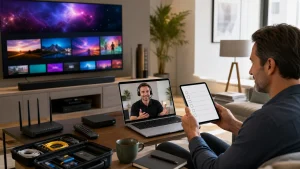
IPTV delivers television over the internet, but the technology alone does not determine whether a service is legal. For an IPTV subscription in Canada, legality depends on whether the service has the rights to distribute the content it offers. This distinction matters when comparing live sports and television options.
You’re right to look beyond a channel count: the lineup only helps if it suits what you actually watch. This guide explains what to consider about legality, live and on-demand content, trial terms, customer support, and Canadian sports coverage before choosing. You’ll also see how to compare subscription options and spot the details that can shape your viewing experience, so you can make a more informed choice.
Key Takeaways
- IPTV’s legality depends on whether the service has the rights to distribute its content, so consider content rights alongside channel selection.
- Compare live channels, on-demand choices, and the sports you follow to see whether a lineup fits your viewing habits.
- Use a trial to explore the service and its setup before choosing a subscription duration.
- Check how simultaneous connections work for your household, especially if people watch on different devices at the same time.
- Edge IPTV offers a 24-hour trial and subscription options from one month to 12 months, giving you a way to explore before choosing a longer term.
Is IPTV Legal in Canada?
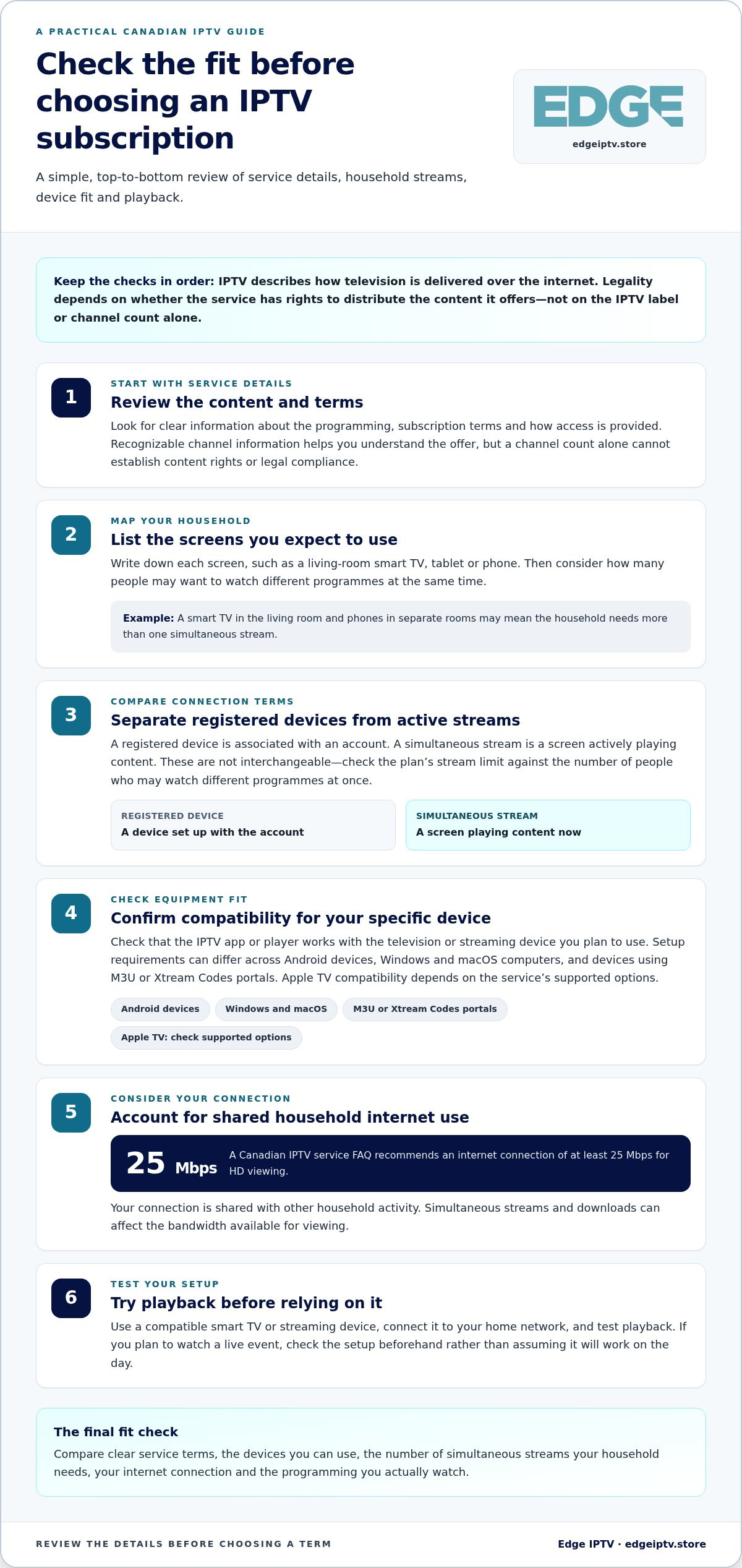
IPTV describes how television content is delivered; the label alone does not establish whether a service complies with Canadian law. Look for clear information about the programming, subscription terms, and how access is provided. A large channel count cannot answer those questions on its own.
Before subscribing, review the service details and terms. Look for recognizable channel information and a clear explanation of what the subscription includes. These details help you understand the offer, but a device brand or app name does not determine whether the service complies with applicable rules.
Connection limits matter too. A device connection may mean a device registered to an account, while a simultaneous stream means a screen actively playing content. These terms are not interchangeable. For example, a household with a living-room smart TV and phones in separate rooms needs to know how many streams can play at once, not just how many devices can be set up.
Plans can differ in subscription length, included features, and simultaneous connections. A one-stream plan may suit someone who watches on one screen at a time. A household watching different programmes on multiple TVs needs enough simultaneous streams. Compare the connection limit with your viewing routine before choosing a term.
- List every screen you expect to use, such as a smart TV, tablet, or phone.
- Count how many people may watch different programmes at once.
- Separate registered devices from concurrent streams in the plan terms.
Device compatibility is another practical step. Check that the IPTV app or player works with your specific television or streaming device. Android devices, Windows and macOS computers, and devices using M3U or Xtream Codes portals can have different setup requirements. Apple TV compatibility depends on the service’s supported options, so don’t assume every app works across platforms.
For HD viewing, a Canadian IPTV service FAQ recommends an internet connection of at least 25 Mbps. The connection is shared with other household activity, so simultaneous streams and downloads can affect available bandwidth. Use a compatible smart TV or streaming device, connect it to your home network, then test playback before relying on it for a live event.
To compare subscription details and device fit, review the IPTV subscription information alongside your household’s screen needs. A useful choice balances clear service terms, compatible equipment, stream limits, and the coverage you actually watch.
Live channels and on-demand content
Compare live channels and on-demand titles separately because they serve different needs. Check whether the lineup makes it easy to find Canadian programming, French-language options, sports, and a catalogue that suits your household.
Canadian and French-Language Channels
Start with the categories you watch, such as Canadian news, entertainment, local programming, and sports like hockey or football. Check for French-language channels and programmes if viewers in your home prefer French. Channel names and language labels help you judge whether the selection suits your routine, rather than relying on a headline count.
Consider how each priority channel fits into your week. Your household might want French-language news in the morning, Canadian entertainment at night, and live sports on weekends. An electronic programme guide (EPG) can help you find channels by showing programme names and schedules. Review the actual listings, not just category labels.
Regional Coverage and On-Demand Catalogue
Regional coverage matters if you follow local news, teams, or programming. Look for listings that identify the region or local feed, then compare them with the places and events that matter to you. A channel listed under a broad Canadian category may not provide the specific regional programming you expect.
On-demand catalogues work differently from live TV channels. They let you choose a movie or series from a library, rather than joining a programme already in progress. Some IPTV catch-up features let viewers replay shows for up to 7 days after broadcast. Check whether the titles you want appear in the catalogue and whether catch-up applies to the channels you watch.
Compare three parts of the offer separately: live TV channels, replay or catch-up, and on-demand movies and series. This makes the differences clearer. Someone who mainly watches live football may prioritize sports channels and schedule information, while a viewer who watches dramas at different times may care more about the library and episode selection.
- Search for Canadian and French-language channel names you already watch.
- Check regional labels for local programming and sports coverage.
- Browse the on-demand library for specific films or series, not just broad categories.
- Use an Android device or TV interface to see how easily you can search and switch between live channels and titles.
Before choosing, make a short list of must-watch channels, languages, and shows. Compare that list against the live guide and on-demand catalogue, then review the subscription channel details to explore the available lineup.
Free trial duration and terms
A 24-hour free trial gives you a focused window to test IPTV streaming before selecting a subscription. Use it to assess activation, navigation, and playback on the equipment you plan to use, rather than treating a short test as proof of long-term performance.
Can you cancel an IPTV subscription in Canada, and what consumer protection rules apply? You can request cancellation using the process in your subscription terms; refund eligibility depends on those terms and the consumer protections applicable to your province or territory. Read the cancellation and refund conditions before paying, and keep your confirmation.
Plan your trial around your usual viewing. Sign in on the device you expect to use, such as a Windows computer or compatible television, then test live programming and on-demand movies. If you watch at different times, try both. A quick setup on one screen will not show how the service works across your routine.
Activation is a practical first test. Follow the setup steps, enter your access details, and open the channel guide. Check that menus load, titles are searchable, and the content you want appears. If playback stalls, note the time and device. This can help distinguish a setup issue from a broader streaming problem.
Trial access and a money-back guarantee are different. A trial lets you evaluate access before choosing a paid plan; a guarantee sets conditions for requesting a refund after purchase. Do not assume one includes the other. Check the eligibility period, request process, exclusions, and whether cancellation must be handled separately.
During the trial, test the parts that can affect your decision:
- Open live channels and start an on-demand film.
- Check whether the programme guide makes channel names and schedules easy to find.
- Try the service on the intended device and internet connection.
- Review when trial access begins and when it ends.
- Save the terms and any activation or cancellation confirmation.
Use any trial access deliberately. Test during the period when you’re most likely to watch, including a live programme if that matters to you. IPTV relies on an internet connection, unlike satellite television, so a trial also lets you see how your own network handles playback.
Before selecting a longer subscription, compare the trial experience with the written plan terms. If you want to assess access first, the 24-hour IPTV trial provides a defined period for testing setup and viewing.
Customer support
Support matters during setup and when playback problems interrupt a programme. Review the provider’s stated help channels and device-specific instructions. Useful guidance explains where to enter account details on a smart TV, rather than simply saying “install the app.” Clear steps make a new setup easier to follow.
Activation support should make your first session straightforward. Follow the setup instructions in order: install a compatible player, enter your service details, then open the channel guide. If a step fails, note the device model, player, and error message. Those details give support a practical starting point instead of a vague report that IPTV is not working.
Troubleshooting is easier when you isolate the issue. If a stream buffers on an Amazon Fire Stick, test another channel and then another device on the same internet connection. If the issue occurs on just one screen, focus on that device’s app or network. If several devices have the same problem, note the pattern before contacting support.
Support may be available through chat, email, or a support portal, depending on the provider. Review the listed contact method and availability before choosing. If you plan to watch a live event, set up your device and resolve questions beforehand. That leaves time to follow troubleshooting steps without missing the opening moments.
Money-back terms are separate from other support details. A guarantee may set a deadline, eligibility conditions, and a request process; it does not automatically explain how to cancel recurring access. Read both policies before paying, save the terms, and keep any confirmation message. If you switch plans, retain the new subscription details alongside the original order record.
Use this quick support check before subscribing:
- Find setup instructions for your device, such as a smart TV or Amazon Fire Stick.
- Identify the support channel and its stated availability.
- Locate cancellation and refund steps, including eligibility conditions.
- Save account, order, and troubleshooting details together.
Premium IPTV is more practical when setup guidance is easy to follow and help is available for specific issues. Try the instructions on the device you will use most, and note any unclear steps. A Windows computer and a smart TV may use different players or login screens, so device-specific guidance can help you get started.
Clear support information helps you judge whether a service suits your household, especially when viewers use different screens. Compare setup guidance, troubleshooting steps, and refund terms alongside the channel lineup. This gives you a clearer view of what the subscription delivers beyond access to television.
Canadian sports and live television
For sports fans, the key question is whether live television carries the events they follow. A broad sports label does not tell you which games, competitions, or broadcasts are available. List the teams and events that matter to you, then compare them with the channel guide and scheduled listings.
Think across the season, not just the next game. Your viewing list might include NHL hockey, the CFL, NBA basketball, MLB baseball, NFL football, Premier League matches, Champions League fixtures, or UFC events. Treat these as examples to search for, not a promise that every service carries every event. Availability can differ by channel and schedule.
Timing and navigation matter for live sports. Use an electronic programme guide to find the broadcast, check its scheduled start, and identify the channel before the event begins. A clear guide helps distinguish a live broadcast from a replay or related studio programme. Search by event or channel if the interface allows it.
Plan for different viewing habits in your household. One person may want a hockey game in the living room while someone else watches another programme on a separate screen. Match that routine to the subscription’s simultaneous-connection terms. A device limit and the number of streams that can play at once are different, so compare the exact wording.
Prepare your setup before a major live event. Open the guide, locate the channel, and test playback on the television you plan to use. If the stream does not load, note whether other channels work and whether the issue affects other devices. This gives you useful information for troubleshooting before the event starts.
- List the leagues, teams, and events you actually follow.
- Find their scheduled broadcasts in the live guide.
- Check whether replays or catch-up viewing matter to your routine.
- Plan household connections for viewers watching different programmes.
- Test the intended screen before a live event starts.
Sports coverage is only one part of a live TV decision. Consider the full lineup, including news, entertainment, and programmes other household members watch between games. Compare those channels with event listings to decide whether the overall selection suits your week, not just one match.
Make your shortlist before choosing a plan, then compare it with the subscription channel options. That keeps the decision grounded in the live sports and television your household wants to watch.
Edge IPTV: 12 Month
Edge IPTV offers live sports, pay-per-view events, 6500+ channels, and on-demand movies and TV shows. Its 12 Month subscription suits viewers ready to choose a longer term after comparing the lineup, device compatibility, and viewing needs covered above.
If you’d rather start with a shorter commitment, options also include 6 Months, 3 Month, and 1 Month subscriptions. Compare the available durations with how often you watch and whether the channel mix fits your household. The electronic programme guide helps you browse live programming, while the on-demand selection gives you another way to choose what to watch.
Explore Edge IPTV’s subscription options and choose a term that fits your viewing plans. Visit edgeiptv.store for more information.
Make Your Next Viewing Choice
Your next step is to match a subscription term to how settled your viewing habits are. If your lineup and routine already feel right, a longer term may suit you; if you prefer flexibility, start with a shorter option. Edge IPTV offers 12 Month, 6 Months, and 3 Month subscriptions, so you can choose a duration that fits your plans.
For an IPTV subscription in Canada, let your viewing priorities guide the decision. Consider the programmes you return to, the devices you use, and whether your household’s needs may change. A considered choice is more useful than signing up based on channel count alone.
Ready to explore the available options or discuss what fits your viewing plans? Contact Edge IPTV. Take the next step at your pace and build a setup around the entertainment you enjoy.
Frequently Asked Questions
What is IPTV and How Does It Work?
IPTV delivers television programming as data over an internet connection. When you choose a programme, the player requests the stream and displays it as it arrives, rather than saving a complete file first. Selecting a live hockey broadcast starts a continuous stream, while choosing a film from a library starts an on-demand stream. The player and internet connection work together to deliver the content.
How To Get IPTV Subscription?
To get an IPTV subscription, decide which content and viewing setup matter most. Make a shortlist of must-watch programmes, the devices you plan to use, and how often you expect to watch. Compare plan terms, choose an option, and complete the provider’s order process. Keep your order confirmation and account instructions together so they are easy to find if you need to review your purchase.
How do I set up IPTV on my device step-by-step?
Set up IPTV by matching the player’s connection method to the details supplied with your account. Before entering them, check that letters, numbers, and punctuation are copied accurately. Select the applicable login or playlist option in the player, enter the supplied details, and save the connection. If setup fails, compare each field with the original instructions and correct one entry at a time, rather than replacing all settings.
Do you offer support for IPTV setup and technical issues?
Yes, Edge IPTV provides support for setup and technical issues. Describe the device and player, the action you took, and the exact message or behaviour you saw. For example, explain whether login failed, a menu stayed blank, or playback stopped after starting. Include what you have already tried, such as reopening the player, so support can focus on the next troubleshooting step.
How do I setup IPTV on my Fire Stick or Smart TV?
On a Fire Stick or smart TV, start by identifying the player you will use and the account details it requires. Menus differ by device, so follow the relevant setup instructions rather than assuming the steps are the same. Enter your account information carefully, then check whether the player accepts it. If your TV’s app options do not include a compatible player, use a supported streaming device connected to the television.
How much does IPTV cost compared to cable TV?
IPTV and cable costs depend on the package, subscription period, and included programming. Compare services based on the channels your household watches, not just the advertised package size. Consider whether internet service is billed separately from television and whether equipment or add-ons affect the household total. A simple table of monthly charges, included channels, and extra costs can show which option better matches your viewing habits.
What is IPTV and how does an IPTV subscription work in Canada?
For an IPTV subscription in Canada, the plan terms explain what access you receive and for how long. Before ordering, review whether the subscription renews, how cancellation works, and which content is included. Keep a copy of the terms with your receipt. This is useful when comparing plans for a household, giving everyone a shared reference for account use and renewal decisions.
How much do IPTV subscriptions cost in Canada per month?
Monthly IPTV costs vary by provider, plan length, and included features. To compare a multi-month option with month-to-month billing, divide the total plan charge by the number of months covered. Then compare what each plan includes, such as live programming or on-demand access. Use the checkout total and billing period for your calculation; do not treat a longer-term total as the cost of one month.